

Running a generator service business shouldn’t require juggling Access databases, Excel spreadsheets, and paper contracts. But that’s exactly where our client was—drowning in disconnected systems that made growth nearly impossible. We built them a custom field service management platform that replaced the chaos with one integrated system. Here’s how it works.
[VIDEO: Full Platform Demo – 13 minutes]
The Problem
Our client had a successful generator service business serving residential and commercial customers. But their operations ran on tools never designed to work together:
Access databases stored customer and equipment data—but only worked on office computers. Technicians in the field had to call the office for basic information.
Excel spreadsheets tracked inventory across multiple warehouses. Reconciling stock levels meant hours of manual work, and nothing stopped them from ordering parts they already had or running out of critical supplies.
Manual route planning meant someone spent hours every week plotting technician schedules on maps, calculating drive times, and hoping nothing changed.
Word document contracts required printing, physical signatures, scanning, and filing. Lost paperwork and signature delays were constant problems.
These weren’t just annoyances—they were limiting growth. More customers meant proportionally more administrative work, and the business couldn’t scale without fixing the foundation.
What We Built
Settings: Tasks and Contract Templates
Before scheduling anything, service companies need to define what work gets done. The platform starts with a settings area where you create reusable task templates—things like “Check oil level,” “Inspect battery,” or “Test transfer switch.” Each task has an estimated completion time. Then you build contract types. A standard 12-month maintenance contract might include four service appointments. You assign which tasks happen at each appointment, and the system calculates how long each visit should take based on the task estimates. This setup work happens once, then gets reused for every customer contract.
Inventory That Actually Works
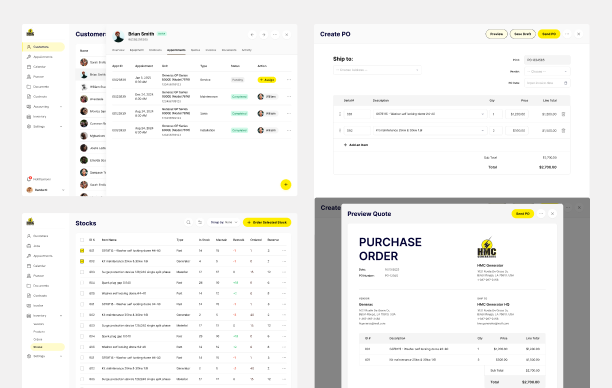
The inventory module replaced multiple Excel files with real-time tracking across all warehouse locations. You can see what’s in stock, what’s on order, and what needs reordering—all in one place. When stock runs low, you filter for items below minimum levels, select what you need, and create a purchase order. The system generates PO numbers, sends orders to vendors, and tracks everything through receiving. When items arrive, you mark them received, assign serial numbers to generators, and stock levels update automatically. When technicians use parts on jobs, they log it in the mobile app and inventory adjusts in real-time.
[VIDEO CLIP: Inventory Management – 2 minutes]
Customer and Equipment Management
Every customer—whether individual or company—has a profile with contact info and property locations. This matters because one customer might have generators at multiple sites. Each piece of equipment has its own record showing purchase date, warranty expiration, and complete service history. When a technician arrives on-site or the office gets a call, all this information is immediately available.
Creating Contracts
Here’s how it works in practice: You add a customer (or open an existing one), assign equipment to their property, then create a service contract. You select a contract type—say, the 12-month plan with four appointments. Set the start and end dates, then pick estimated dates for each maintenance visit. The system shows all the tasks that will be performed based on your template, along with estimated appointment duration. Add your pricing, generate the contract document, and send it electronically. The customer gets an email, reviews the contract, and signs it digitally—no printing, no physical delivery, no scanning. The system tracks it from “sent” to “accepted” automatically.
[VIDEO CLIP: Contract Management & Electronic Signatures – 4 minutes]
Scheduling and Route Planning
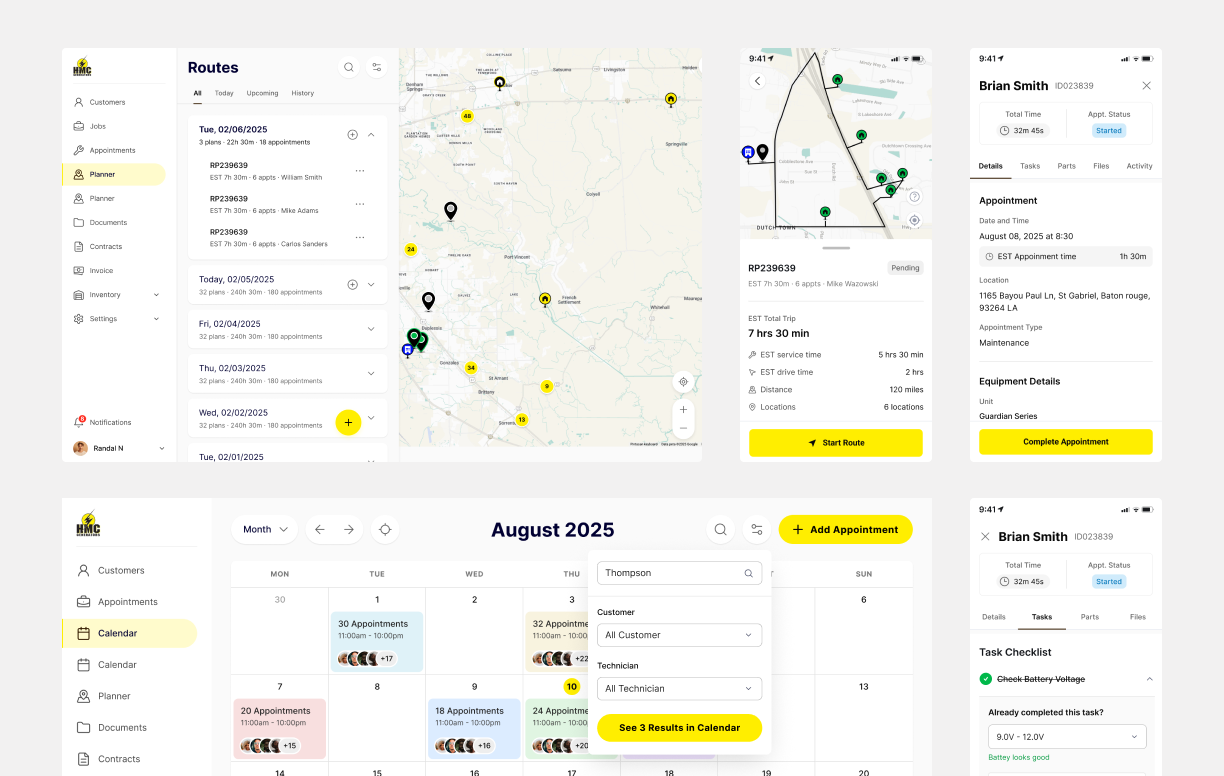
Once contracts are active, you need to schedule actual appointments. The planner shows all your customers on a map. Select the ones due for service, and the system calculates an optimized route. It factors in drive time between locations and service duration at each stop. Three appointments taking 44 minutes, 1 hour, and 30 minutes, plus drive times? The system tells you the entire route will take 3 hours and 17 minutes. Assign the route to a technician, set the date, and you’re done. What used to take hours of manual planning now takes minutes.
[VIDEO CLIP: Intelligent Route Planning – 3 minutes]
Mobile App for Technicians
Technicians get a mobile app with their daily schedule and all appointment details. At each stop, they see the customer info, equipment details, and task checklist. As they complete tasks, they track actual time versus estimated time. They can log parts used, take photos, and add notes. When finished, they generate a service report and share it with the customer on the spot—no more waiting days for paperwork to get processed back at the office. The system compares estimated versus actual times, helping the company improve future estimates and identify training opportunities.
What Changed
Contract time went from hours to minutes. What used to require creating Word docs, printing, delivering for signature, and scanning now happens electronically with a few clicks.
Inventory visibility went from “check multiple spreadsheets and hope they’re current” to “see real-time stock levels across all locations instantly.”
Route planning dropped from hours of manual work to minutes of automated optimization.
Administrative overhead decreased because data entry happens once—in the field—instead of technicians writing things down and office staff transcribing everything later.
Customer response time improved because anyone in the office can instantly pull up complete service history, warranty info, and upcoming appointments.
Why Novateus
The client chose us because we understood their actual operations, not just generic “field service.” We’ve built inventory systems, mobile apps that work offline, and route optimization before. We knew what would work and what wouldn’t.
“They didn’t just build software; they engineered a complete operational transformation,” the client said. “They understood field service operations and created something our people actually wanted to use.”
What’s Next
We’re adding payment processing and invoicing to close the financial loop, quote management so technicians can sell additional work on-site, and installation job tracking for new generator installations. Enhanced analytics will predict maintenance needs, forecast parts demand, and provide AI-powered optimization insights. A customer portal will let clients view their service history and schedule appointments themselves.
This is what software modernization looks like in practice—replacing disconnected legacy tools with purpose-built software that actually solves real problems.
Want to modernize your field service operations? Contact us to discuss what’s holding your business back.